
Shake ON/OFF21.0 - Google Play
You'll be able to see results in few seconds.
Publisher Description
Shake ON/OFF application allows you to lock your phone Also it allows you to again your screen ON without pressing Power button.
Application provide three way to lock and screen ON your phone
*****IMP Note**************
Please keep around 5 second interval between each SHAKE ON and OFF and vice versa
Please remove apps like task killer/ ram booster/memory cleaner etc to run this app really well.
************************
**********First Method: Using Hand Shake*******************
First select radio button of "Using Shake" then select type of Shake
For example
If you want to lock phone using vertical shake and want to open screen using Horizontal Shake.You have to select Shake type from application: Vertical OFF Horizontal ON
And for vice versa select Horizontal OFF Vertical ON
If you want to lock and unlock screen any type of Shake then select any type shake
**IMP**
Different devices has different shake sensitivity
change default shake sensitivity according to your choice and make shake hard or easy. it upto you.
you can change sensitivity from 100 to 999 (enough for all devices)
**********Second Method: Using Smart Cover*******************
if you have Pouches or flip type cover for your device which covers your skin of device then this option helpful to you.
This option allows you to ON/OFF screen by using phone's cover.If you Off phone's cover,screen will automatically OFF and If you open cover, screen will be automatically ON
For this method proximity sensor required into device otherwise not work this method
**********Third Method: Using Hand over *******************
Very simple and Recommended method
Also when your cover veil your device, Device will automatically locked with screen OFF and when your cover unveil your device
screen will automatically ON
For this method proximity sensor required into device otherwise not work this method
**********************************************************************************************************
We would love to see your feedback or suggestions if there are any. You can share your thoughts with us at android@drcinfotech.com or visit us on http://www.drcinfotech.com
^^^^^^^^^^^^^^^^^^^^^^^^^^^^^^^^^^^^^^^^^^^^^^^^^^^^^^^^^^^^^^^^^^^^^^^^^^^^^^^^^^^^^
How to Uninstall
There are two method to uninstall this application
#### Method 1 #####
$ First open this application
$ If Active Toggle button is ON then turn OFF it.
$ Now uninstall as usual
###### Method 2 #####
Go Settings->Security-> Select device administrators->Shake ON/OFF (unselect checkbox)
Now uninstall as usual
************************************************************************
Disclaimer
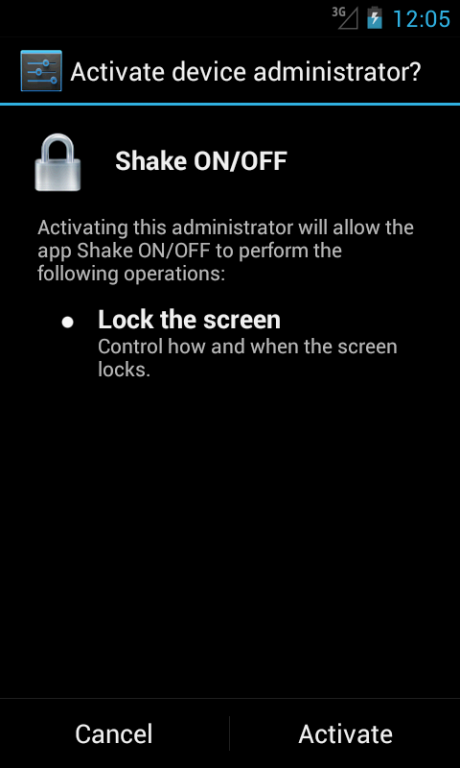
"Shake ON/OFF" doesn't use any tricky way to prevent uninstalling. It just uses a system level permission (Device Policy Manager) to turn screen off which needs the user's confirmation. The user need to remove the permission authorization before uninstalling this app.
About Shake ON/OFF
The company that develops Shake ON/OFF is DRC INFOTECH. The latest version released by its developer is 21.0.
To install Shake ON/OFF on your Android device, just click the green Continue To App button above to start the installation process. The app is listed on our website since 2015-02-02 and was downloaded 0 times. We have already checked if the download link is safe, however for your own protection we recommend that you scan the downloaded app with your antivirus. Your antivirus may detect the Shake ON/OFF as malware as malware if the download link to com.drcinfotech.shakescreenonoff is broken.
How to install Shake ON/OFF on your Android device:
- Click on the Continue To App button on our website. This will redirect you to Google Play.
- Once the Shake ON/OFF is shown in the Google Play listing of your Android device, you can start its download and installation. Tap on the Install button located below the search bar and to the right of the app icon.
- A pop-up window with the permissions required by Shake ON/OFF will be shown. Click on Accept to continue the process.
- Shake ON/OFF will be downloaded onto your device, displaying a progress. Once the download completes, the installation will start and you'll get a notification after the installation is finished.
Program Details
System requirements
Download information
Pricing
Version History
version 21.0
posted on 2015-02-02
New features incorporated in SCREEN ON/OF – 20.0:,Shake ON/OFF Bug fix. please update this version
Disclaimer
Official Google Play Link
We do not host Shake ON/OFF on our servers. We did not scan it for viruses, adware, spyware or other type of malware. This app is hosted by Google and passed their terms and conditions to be listed there. We recommend caution when installing it.
The Google Play link for Shake ON/OFF is provided to you by apps112.com without any warranties, representations or guarantees of any kind, so access it at your own risk.
If you have questions regarding this particular app contact the publisher directly. For questions about the functionalities of apps112.com contact us.
